

Abandonment is not one event
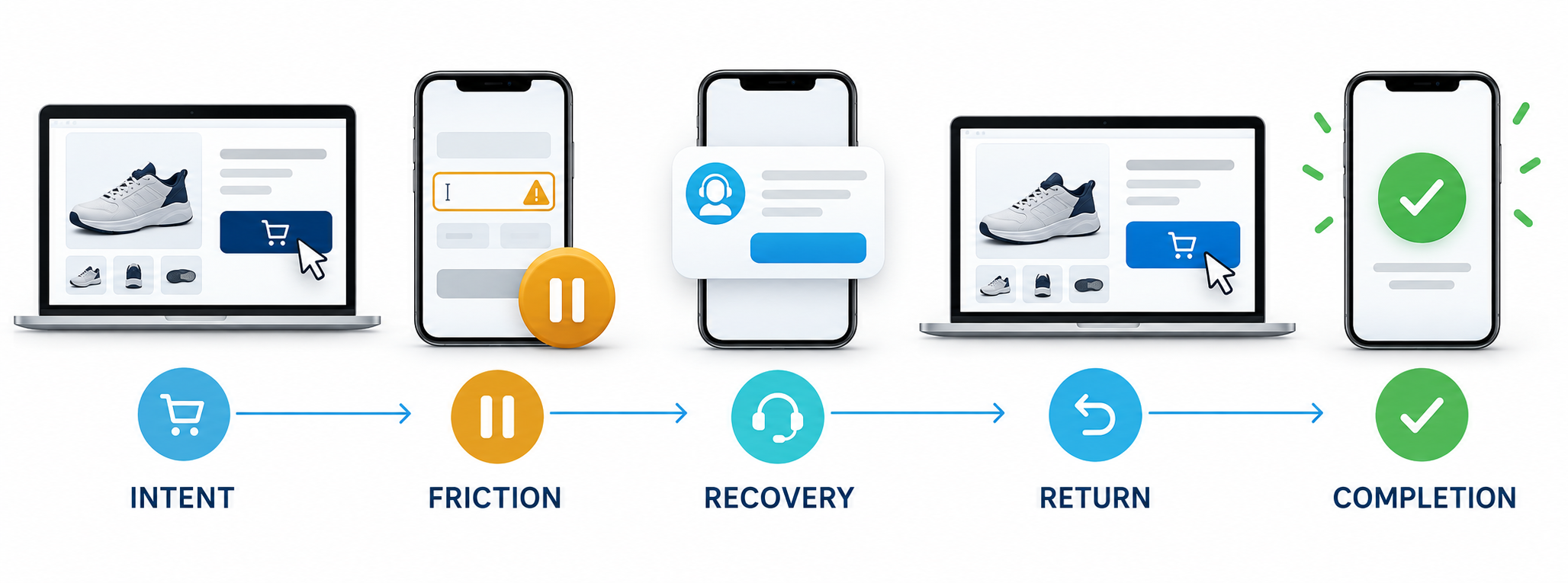
A visitor can abandon a shopping cart, a product page, a lead form, a pricing decision, a booking flow, a quote request, a subscription signup, or a general high-intent landing page. The final exit is visible, but the real opportunity usually begins earlier. The visitor may hesitate, reverse direction, stop interacting, compare repeatedly, search for reassurance, or reach a point where the next action feels too difficult.
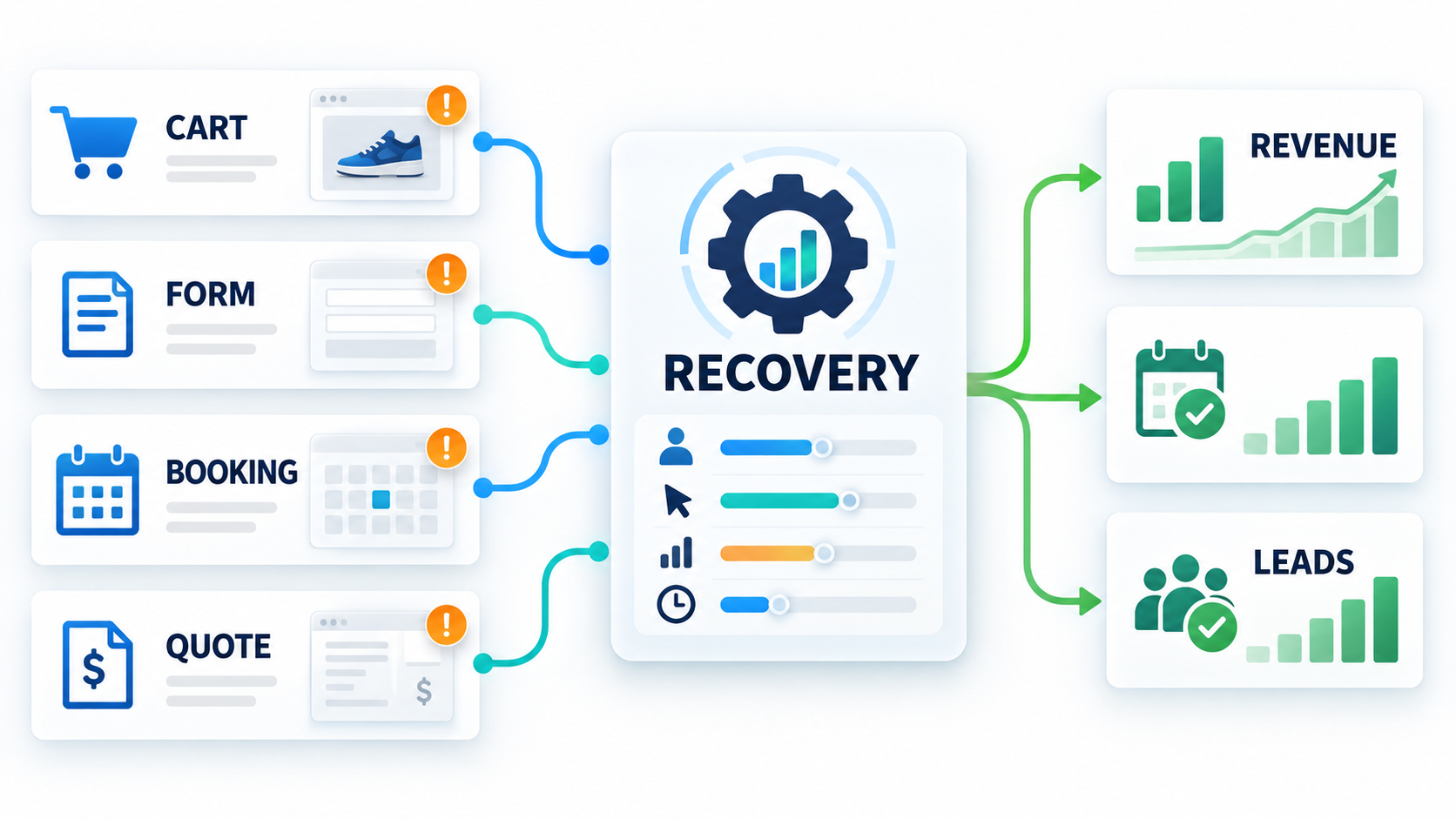
RAS Abandonment Recovery is designed around that larger journey. It helps teams define what they want to recover, decide where an experience should appear, select the behavior that should activate it, control who can see it, capture a response, and measure what happened afterward. The result is a recovery system rather than a collection of disconnected popups.
This guide covers the Abandonment Recovery capabilities available in RAS and explains how the pieces work together across acquisition, conversion, lead follow-up, ecommerce merchandising, and revenue attribution.
Recovery begins with a business goal
The campaign builder starts with the outcome the business wants to protect. RAS supports recovery goals for abandoned carts, product-page exits, incomplete forms, pricing-page exits, booking drop-offs, email capture, and general site exits. This matters because each journey represents a different customer need.
A cart visitor may need delivery clarity or a saved purchase path. A product-page visitor may need fit, compatibility, inventory, or comparison guidance. A pricing visitor may need a clearer explanation of value. A booking visitor may need another time or a callback. A form visitor may need a shorter path, privacy reassurance, or help completing the request.
Defining the goal first keeps the recovery experience focused. The system is not simply asking how to stop someone from leaving. It is asking which valuable action is at risk and what information or assistance could make that action easier.
Guided templates provide a practical starting point
Teams do not have to design every campaign from an empty screen. RAS includes guided recovery templates that can shape the initial message, offer, capture mode, targeting logic, and experience format around common use cases. Examples include cart rescue, product reassurance, email capture, lead callback, and product recommendation experiences.
Templates provide a starting configuration rather than a permanent restriction. The campaign can still be adjusted to match the brand, customer journey, and commercial goal. This helps a small team launch quickly while giving an experienced team enough control to refine the details.
The builder also supports campaign names, priority weights, start dates, and end dates. Priority is useful when several campaigns could qualify on the same page. Scheduling is useful for seasonal offers, limited-time reassurance, campaign launches, and recovery experiences that should stop automatically.
Four experience formats cover different recovery moments
RAS supports several ways to deliver recovery assistance. The right format depends on whether the business needs an interruption, persistent help, embedded reassurance, or product discovery.
- Automatic popup: presents a recovery message after a configured abandonment signal. It is useful for exit intent, inactivity, reverse scrolling, offers, email capture, and urgent reassurance.
- Embedded reassurance: places assistance inside a named page location. It can answer a concern without interrupting the visitor and is useful near pricing, forms, delivery information, or commitment points.
- Assistance bar and drawer: gives the visitor a visible help entry point that opens additional guidance when requested. This is useful when the business wants support to remain available without forcing a modal.
- Inline recovery favorites: presents selected products directly in the page experience. It is built for ecommerce journeys where better product discovery can preserve intent.
Embedded and inline formats use a verified placement key so the team knows where the experience belongs on the client site. In-page formats can also use holdout groups, allowing a portion of eligible ecommerce sessions to receive no recovery experience so the business can compare order outcomes more responsibly.
Campaign modes match the desired response
The visual format determines where the experience appears. The campaign mode determines what the business wants the visitor to do. RAS supports simple offers, email capture, lead capture, cart recovery, and informational reassurance.
A simple offer can present a promotion or direct call to action. Email capture preserves a path for follow-up. Lead capture can request selected contact fields and a message. Cart recovery can combine a purchase-oriented message with offer or product context. Informational mode can resolve uncertainty without requiring personal information.
This distinction is important because recovery should not always ask for an email and should not always use a discount. If the real problem is uncertainty, the best intervention may be a concise answer. If the visitor needs human help, a callback request may be stronger. If the customer is already close to purchase, a direct path back to the cart may be enough.
Creative controls keep the experience on brand
Campaign teams can configure the campaign label, headline, subheadline, body text, offer code, primary action, destination URL, dismiss language, success message, image, and offer badge. Layout options include standard, editorial, split-offer, and product-spotlight presentations, with image placement hidden, above the content, or beside it.
Style controls support the visual details needed to make a recovery experience feel like part of the site rather than an unrelated widget. Teams can preview the result for desktop and mobile before publishing.
Strong creative should answer the customer concern with as little friction as possible. A long message can become another obstacle. A generic message may not create enough confidence. The best creative explains why the visitor should continue and makes the next action obvious.
Desktop and mobile triggers recognize different behavior
Desktop exit intent and mobile abandonment are not the same behavior. A desktop visitor may move the pointer toward the browser controls or leave the active page area. A mobile visitor has no pointer, so the system needs other signals.
RAS supports desktop exit thresholds along with minimum time on page and minimum scroll depth. Mobile rules can use inactivity, reverse scrolling, and back-intent behavior. Device-specific activation lets teams enable desktop, mobile, or both without pretending that one trigger model fits every screen.
Minimum engagement requirements matter because a recovery campaign should not activate on every casual visit. Time and scroll signals help distinguish a visitor who has meaningfully engaged from someone who arrived accidentally or left before understanding the page.
URL and visitor rules make campaigns selective
Campaign targeting includes page rules and audience conditions. Teams can define URL patterns that should include the campaign and patterns that should exclude it. This makes it possible to focus on product pages, checkout paths, pricing sections, booking journeys, service pages, or campaign landing pages while protecting account pages, support flows, and other areas where recovery is not appropriate.
Device targeting allows different eligibility for desktop and mobile. Visitor rules can focus on new visitors or returning visitors when the message should reflect relationship context. Campaign dates and priority provide another layer of control when several experiences are active.
Selective targeting protects relevance. The goal is not to maximize popup volume. The goal is to deliver useful assistance where qualified intent is most likely to be recoverable.
Frequency controls protect the customer experience
Even a relevant recovery message becomes harmful when it appears too often. RAS includes session suppression and maximum display controls so the same visitor is not repeatedly interrupted. Campaign runtime also respects cooldown behavior when evaluating whether an eligible experience should appear.
Frequency design should match the commercial moment. A high-intent checkout journey may justify one carefully timed intervention. A general content page may need a lighter rule. A returning customer who already dismissed an offer should not be forced through the same experience every time.
These controls help recovery remain helpful rather than desperate. They also make campaign metrics more meaningful because performance is not inflated by repeatedly showing the same message to the same person.
Lead capture turns anonymous hesitation into a workflow
When a visitor is willing to continue through human follow-up, RAS can capture selected fields such as email, first name, last name, phone, postal code, and a message. Teams decide which fields are collected and which are required so the recovery form can remain proportionate to the request.
Captured leads enter a client-scoped workflow. Authorized users can filter by site, lead type, status, assignee, and keyword. A lead can move through new, assigned, in-progress, qualified, converted, resolved, ignored, or spam states. Teams can assign follow-up, set a follow-up time, add internal notes, and record attribution notes.
This closes an important operational gap. Recovery is not complete when a form is submitted. The opportunity still needs ownership, a next action, and a way to record the result.
Ecommerce recovery can include products, not only offers
For ecommerce sites, RAS can maintain a set of recovery products with product URLs, images, prices, comparison prices, currency, availability, badges, descriptions, and selection weights. A campaign can show a recently viewed match when available and fall back to a weighted recovery favorite when no match exists.
This creates several useful paths. A visitor who hesitated on a product can be reminded of that item. A shopper who did not find the right fit can be shown a featured alternative. A seasonal campaign can emphasize selected inventory. Product cards can include price, badge, description, and a direct product action.
Availability controls prevent an out-of-stock item from becoming the recovery recommendation. Preview scenarios let the team inspect the journey-match, fallback, and no-valid-product states before launch.
Promotion controls protect margin
Recovery campaigns can use promotions, but incentives should be governed carefully. The business can configure eligible promotion codes, minimum improvement expectations, and maximum savings boundaries. This supports a more disciplined use of discounts rather than treating every abandonment event as a reason to reduce price.
The most profitable recovery may come from reassurance, product guidance, saved progress, or easier contact. When an offer is used, the team should understand whether it created incremental completion or simply rewarded a customer who would have converted anyway.
Holdouts and attribution help answer that question. They give ecommerce teams a way to compare exposed and unexposed sessions and connect purchase activity back to the recovery experience.
Preview, URL testing, and launch checks reduce mistakes
Before publication, the campaign builder provides a live creative preview and a URL-and-viewport eligibility tester. The tester evaluates device settings, include rules, exclude rules, campaign state, and whether the selected format can activate under the configured conditions.
Launch checks verify that the site is selected, the campaign is named, the headline and primary action exist, at least one device is enabled, the test URL is ready, product requirements are satisfied, embedded placements are confirmed, and holdout requirements match the site type.
These checks are practical safeguards. A campaign that looks correct in an editor can still fail because its URL pattern excludes the intended page, the device is disabled, the campaign is paused, the product set is empty, or an embedded placement is missing.
Campaign lifecycle controls support real operations
RAS treats campaigns as managed operational records. Teams can save drafts, publish experiences, pause and resume live campaigns, duplicate an existing setup, and archive a campaign with a reason. Version records preserve the configuration associated with a published campaign.
Duplication makes it easier to create related campaigns for another audience, page group, season, or site without rebuilding every setting. Pause controls give the team an immediate way to stop an experience while preserving its configuration. Archiving keeps old work out of the active queue while retaining an accountable record.
Campaign lists show site, status, priority, active window, views, CTA rate, lead rate, attributed revenue, and available actions. That gives operators a clear place to manage the portfolio rather than searching through separate page scripts.
Reporting follows the complete recovery funnel
RAS records the steps between eligibility and outcome. Event reporting can include eligible sessions, trigger activity, views, dismissals, CTA clicks, email submissions, lead submissions, coupon copies, assistance drawer opens, reassurance expansion, promotion activity, and runtime errors.
Performance views calculate CTA rate, dismissal rate, and lead rate. Teams can compare campaigns, review top pages, inspect device breakdowns, and see which product recommendations receive attention. Captured lead reporting includes total leads, lead capture rate, attributed revenue, and the pages that produced the responses.
These metrics answer different questions. Eligibility shows the available audience. Triggering shows whether behavior rules activate. Views show delivered experiences. Dismissals indicate rejection or poor timing. CTA and lead rates show response. Attribution connects response to commercial outcomes.
Revenue attribution separates activity from impact
RAS can connect qualifying recovery interactions to purchase events and distinguish direct and assisted conversion activity. The reporting layer can summarize attributed conversions and attributed revenue by campaign. Lead workflows also allow authorized teams to record attributed revenue and conversion counts when the result occurs through an offline or sales-assisted process.
Attribution is essential because popup clicks alone do not prove value. A campaign may receive attention but create no meaningful outcome. Another campaign may produce fewer clicks but more qualified leads or larger purchases. Revenue and conversion context help the team prioritize the experience that improves the business, not merely the metric that looks busiest.
Exports and access controls support accountability
Authorized client users can export lead activity to CSV for additional reporting or operational follow-up. Export fields include submission time, site, campaign, lead type, workflow status, contact fields, source page, attributed revenue, and attributed conversions.
Abandonment lead data is client-scoped because it may contain customer contact information, messages, page paths, workflow notes, and attribution data. Platform-level operators do not automatically receive access to that client data. This separation supports tenant ownership and limits unnecessary exposure.
Public lead capture also includes validation, session and source rate limiting, and a honeypot check. Those controls help protect campaign forms from obvious abuse while keeping the visitor experience lightweight.
Abandonment Recovery works best with the rest of RAS
Abandonment Recovery can operate on its own, but the broader RAS suite makes the program more informed. SiteMetrics identifies where traffic and conversion activity diverge. JourneyLens shows the clicks, scrolls, corrections, and friction that precede abandonment. Voice of Customer captures the reason in customer language. AdaptiveContent can clarify the journey before intent reaches a critical point. ProductLift improves product discovery. Optimize tests the recovery treatment. Loyalty extends the relationship after conversion.
The connected operating loop is straightforward: measure the leak, observe the behavior, ask for context, design the intervention, target it carefully, measure the outcome, and improve the underlying journey. Recovery then becomes a source of learning, not merely a last attempt to save a session.
A practical rollout sequence
- Choose one high-value journey. Start with checkout, quote requests, pricing, booking, applications, or another action tied clearly to revenue.
- Define qualified abandonment. Decide which behavior demonstrates enough intent to justify intervention.
- Select the least disruptive format. Use embedded reassurance or assistance when it can solve the problem without a popup.
- Write for the likely objection. Match the message to delivery, trust, fit, timing, complexity, or another real source of hesitation.
- Configure targeting and frequency. Limit the experience to appropriate pages, devices, visitors, and display counts.
- Preview and test eligibility. Confirm the URL, viewport, placement, product state, and launch requirements.
- Publish and verify events. Make sure eligibility, triggering, views, and responses are being recorded.
- Review outcomes, not only clicks. Use leads, conversions, revenue, dismissals, and holdouts to judge performance.
- Fix the upstream journey. Use what the campaign reveals to improve the page, form, product content, or checkout itself.
The takeaway
RAS Abandonment Recovery covers the full path from detecting at-risk intent to managing the resulting opportunity. It supports several recovery goals, guided templates, four experience formats, five campaign modes, desktop and mobile behavior, selective targeting, frequency controls, lead capture, ecommerce product recovery, promotion governance, previews, launch checks, lifecycle operations, detailed events, attribution, reporting, and exports.
The most important feature is how those capabilities work together. A trigger without targeting creates noise. A message without customer context feels generic. A lead without workflow ownership goes cold. A click without attribution proves little. RAS connects those pieces so abandonment recovery can become a measurable operating discipline for protecting demand and improving the journey that produced the abandonment in the first place.